How to Run a Bible Memory Campaign with Your Church or Small Group
Running a Bible memory campaign brings your church, small group, or family together around God’s Word. Whether you’re leading a youth group through the book of James, guiding your congregation through an Advent series, or challenging your small group to memorize key verses on faith, Remember Me makes it easy to organize, share, and track your progress together.
This guide walks you through setting up a campaign from start to finish using Remember Me’s subscribable collections and group metrics features.
Why Run a Memory Campaign?
Group memorization creates accountability and community that solo efforts often lack:
- Shared commitment keeps everyone motivated when enthusiasm wanes
- Natural discussion emerges as participants wrestle with the same passages
- Collective progress celebrates the group’s growth, not just individual achievement
- Lasting impact as participants carry Scripture with them long after the campaign ends
Remember Me is ideal for campaigns because it’s completely free (no premium tiers or participant limits), works offline, syncs across all devices, and now offers subscribable collections with group progress tracking.
Step 1: Plan Your Campaign
Before creating your collection, think through these key decisions:
Choose Your Verses
Pick verses that serve your group’s spiritual needs:
- Topical collections around themes like faith, hope, love, anxiety, or identity in Christ
- Book studies working through James, Philippians, or a Psalm
- Seasonal series for Advent, Lent, or a summer challenge
- Foundational passages like the Romans Road or key promises
Tip: 15-25 verses is a sweet spot for most campaigns. Enough to be substantial, achievable enough to complete.
Set Duration and Pace
Match your timeline to your group’s capacity:
| Campaign Length | Suggested Pace | Best For |
|---|---|---|
| 4 weeks | 3-5 verses/week | Intensive studies, motivated groups |
| 6-8 weeks | 2-3 verses/week | Small groups, Sunday school classes |
| 12 weeks | 1-2 verses/week | Families, casual pace |
| Ongoing | Self-paced | Open-ended collections |
Define Success
What does “memorized” mean for your group? Remember Me uses a level system where levels increase with each successful review:
- Level 2+ means a verse is memorized (committed to memory)
- Level 4+ indicates the verse is stable/mastered
- Higher levels mean longer intervals between reviews
Consider setting a group goal like “80% of participants reach level 4 on all verses by the end.”
Step 2: Create Your Collection
Create a New Label
- Open Remember Me and go to Labels
- Tap the + button to create a new label
- Keep the label name short (e.g., “Romans Road” or “Faith Verses”) since it appears as a badge on each verse

You’ll add a longer, descriptive name when you publish the collection.
Add Your Verses
Add verses to your label using any of these methods:
Manual entry:
- Tap Add Verse
- Enter the reference and select your Bible translation
- Use the book icon to fetch the passage automatically
- Assign the verse to your campaign label
Import from another Bible app:
- Copy a verse from YouVersion, Olive Tree, Logos, or other apps
- Remember Me automatically parses the reference and passage
Import from CSV:
- Prepare a spreadsheet with Reference, Passage, Source columns
- Import via Labels → File icon → Import
Organize Your Verses
Order matters for campaigns. Arrange verses in the sequence you want participants to learn them:
- Chronological order for book studies
- Thematic groupings for topical collections
- Progressive difficulty (simpler verses first)
Add Topics to verses to help participants see how they connect to your campaign theme.
Step 3: Publish Your Collection
Once your verses are ready, publish your label to make it available for others to subscribe.
How to Publish
- Go to Labels and tap your campaign label
- Tap the label’s badge (the icon on the left side of the label row) to open label settings
- Select Publish Collection
- Write a compelling description explaining:
- What the collection is about
- Who it’s for
- How to use it in the campaign context

Write a Good Description
Your description helps participants understand the collection’s purpose. Remember Me supports rich text formatting—select text and use the context menu to apply bold, italic, underline, block quotes, bullet points, and more.
A well-crafted description can include theological context, explain your organizational structure, and guide participants through the collection’s purpose. See the F.I.S.H. collection for an example of a richly formatted description.
Get Your Share Link
After publishing, you’ll receive a shareable link like:
https://web.remem.me/collections/704152580857592

This link works for anyone—they don’t need an account to view the collection, though they’ll need one to subscribe.
Step 4: Invite Participants
Share Your Collection
Distribute your collection link through:
- Church announcements or bulletins
- Small group messaging (WhatsApp, GroupMe, etc.)
- Email newsletters
- QR codes on printed materials
What Participants See
When someone opens your collection link and taps Subscribe:
- All verses are added to their account with a new label
- They can start memorizing immediately
- Their progress (review dates, levels) is private to them
- The label shows a bookmark badge indicating it’s linked to your collection

Subscribers are linked to your collection and can receive updates when you modify it. Their memorization progress contributes to your campaign metrics.
Step 5: Track Group Progress
Once you have subscribers, Remember Me provides aggregate metrics showing how your group is doing—without exposing individual progress.
The Metrics Dashboard
Open your published collection to see the metrics panel. Metrics appear once you have subscribers actively working on the collection.
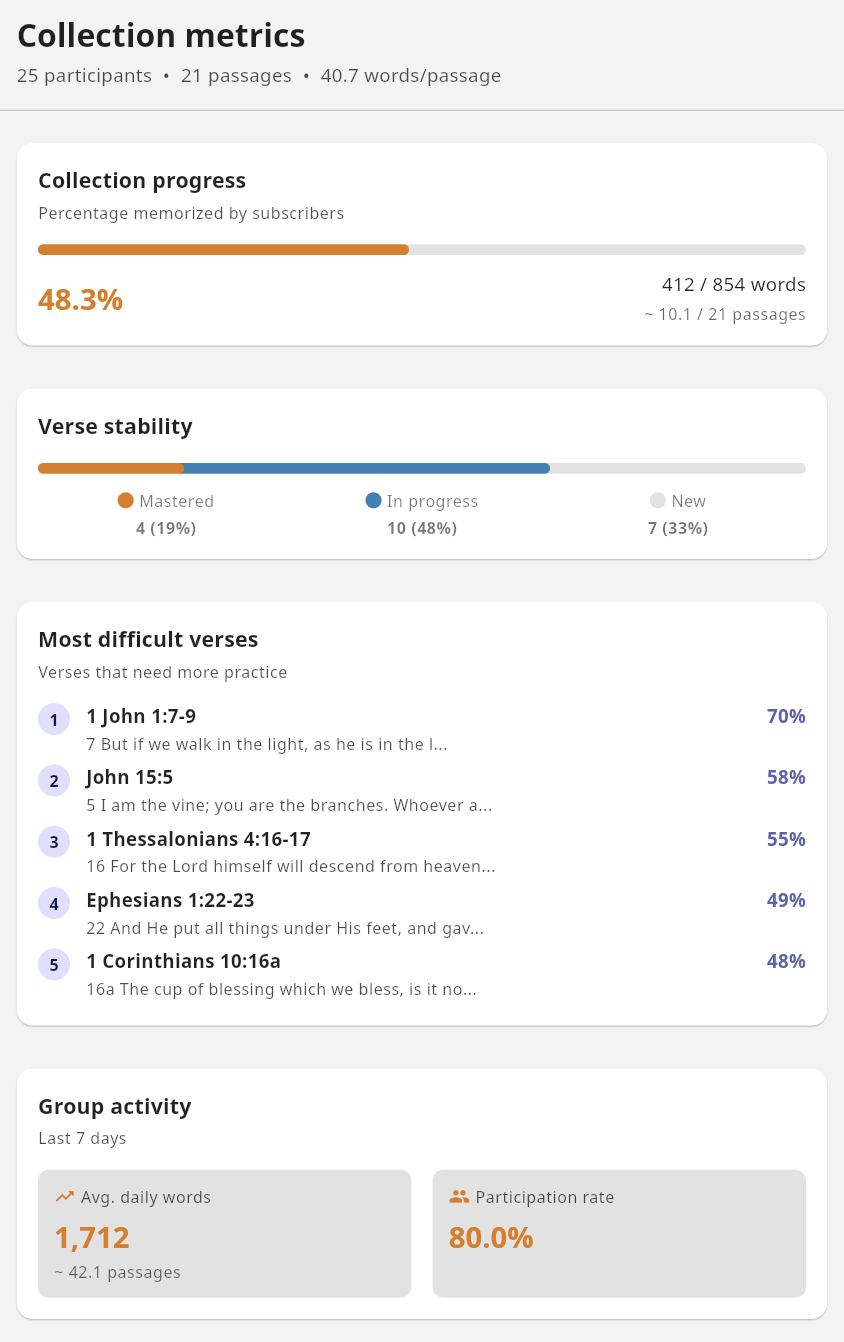
Understanding the Four Metrics
1. Collection Progress
Shows what percentage of the collection has been memorized across all subscribers, calculated by word count and weighted by participation. In the example above: 48.3% complete (412 of 854 words).
2. Verse Stability
Distribution of verses by how well the group has learned them:
- Mastered (orange): 60%+ of participants have this verse at level 4+
- In Progress (blue): 20-59% of participants have reached level 4+
- New (gray): Less than 20% have mastered this verse
In the example: 4 verses mastered (19%), 10 in progress (48%), 7 new (33%).
3. Most Difficult Verses
A ranked list showing which verses the group finds most challenging. The difficulty score combines how many subscribers haven’t yet memorized the verse, how many haven’t mastered it, and how frequently it needs reviewing. Higher percentages mean more subscribers are struggling with that verse.
In the example, 1 John 1:7-9 shows 70%—a good candidate for group discussion or additional teaching.
4. Group Activity
Engagement over the last 7 days:
- Avg. daily words: How many words the group reviews per day (1,712 in the example, about 42.1 passages)
- Participation rate: What percentage of subscribers are actively reviewing (80% in the example)
These metrics help you spot when engagement is dropping so you can encourage your group.
Privacy Note
All metrics are aggregate and anonymous. You cannot see individual participant progress, names, or activity. This protects privacy while still giving you useful campaign insights.
Step 6: Keep Your Collection Fresh
Campaigns evolve. You might need to add verses, fix typos, or update content. Subscribable collections make this easy.
Adding New Verses
Add new verses to your label. Subscribers will see an update notification (a dot on their label’s badge) and can tap to sync. Great for:
- Releasing verses week by week
- Adding bonus content mid-campaign
- Responding to group needs
Fixing Errors
Found a typo or wrong reference? Edit the verse in your collection. When subscribers sync, those who haven’t customized that verse will receive the correction.
How Smart Sync Works
Remember Me automatically detects when you’ve updated your collection and shows subscribers a notification dot on their label. When they tap to sync:
- New verses are added to their collection
- Updated verses receive your changes (if they haven’t edited them)
- Customized verses are preserved—if a participant modified a verse, their version is kept
- Progress is never lost—review history, levels, and commit dates stay intact
This means you can improve your collection without disrupting anyone’s memorization progress.
What If a Subscriber Customizes a Verse?
If a participant edits a verse (changing the passage text, for example), that verse becomes “theirs” and won’t receive future updates from you. This is intentional—it respects their personal study while keeping the option to sync everything else.
Tips for Successful Campaigns
Start Manageable
It’s better to complete a smaller collection than abandon an ambitious one. You can always create follow-up campaigns.
Build in Checkpoints
Schedule regular encouragement moments:
- Week 2: “We’ve started strong!”
- Midpoint: Review difficult verses together
- Final week: Celebration and reflection
Use Metrics Wisely
The difficult verses list is a teaching opportunity. If everyone struggles with Romans 8:28, spend time in your group unpacking its meaning—understanding aids memorization.
Celebrate Together
When your group hits milestones (50% complete, first verse mastered by everyone), celebrate! Recognition fuels motivation.
Keep Communication Open
Create a space (group chat, weekly email) where participants can:
- Share what they’re learning
- Ask questions about verses
- Encourage each other
- Report struggles so you can help
Example: F.I.S.H. My Identity in Christ
For inspiration, explore the F.I.S.H. My Identity in Christ collection—22 verses organized around the ancient Christian fish symbol (Ichthys):
- F (Faith): Verses on redemption of the past through Christ’s sacrifice
- I (Incarnation): Verses on present community and fellowship
- S (Spirituality): Verses on relationship with the Holy Spirit
- H (Hope): Verses on future resurrection and eternal life
This collection demonstrates effective campaign design:
- Clear thematic organization
- Manageable size (22 verses)
- Logical progression building on each section
- Rich description explaining the framework
Campaign Ideas
Need inspiration? Here are some formats to consider:
4-Week Intensive
Topic: Key promises of God Pace: 5 verses per week Best for: Motivated small groups, youth retreats
6-Week Small Group Study
Topic: Book of James (selected verses) Pace: 3-4 verses per week Best for: Regular small group meetings with discussion
Advent/Lent Series
Topic: Prophecy and fulfillment / Passion narrative Pace: 1 verse per day for the season Best for: Church-wide participation, families
Summer Family Challenge
Topic: Psalms of praise Pace: 1-2 verses per week Best for: Multi-generational, relaxed summer schedule
Youth Group Competition
Topic: Armor of God (Ephesians 6) Pace: Team-based, self-paced Best for: Energetic groups who enjoy friendly competition
Running a Bible memory campaign multiplies the impact of Scripture memorization. When your group commits to learning God’s Word together, you build community while hiding truth in hearts that will carry it for a lifetime.
Ready to start? Create your collection and invite your group to join you.